
TO SHOW SEPARATOR: Set class="d-block" on hr element
TO HIDE SEPARATOR: Set class="d-none" on hr element
TO EDIT SPACER: Change the class="spacer-3" to any number between 0 (none) and 5 (most) to resize a spacer. Ex. class="spacer-5"
Vertical spacers are responsive and 50% smaller on mobile than on tablet+.
Redefining the job site.
Turn any scanner's data into a site your whole team can walk.
Bring any scanner's point clouds into Matterport, then share one dimensionally accurate 3D record across Autodesk Forma, Revit, and AutoCAD. Talk to an expert about your workflow.
Register Now
TO SHOW SEPARATOR: Set class="d-block" on hr element
TO HIDE SEPARATOR: Set class="d-none" on hr element
TO EDIT SPACER: Change the class="spacer-3" to any number between 0 (none) and 5 (most) to resize a spacer. Ex. class="spacer-5"
Vertical spacers are responsive and 50% smaller on mobile than on tablet+.
TO SHOW SEPARATOR: Set class="d-block" on hr element
TO HIDE SEPARATOR: Set class="d-none" on hr element
TO EDIT SPACER: Change the class="spacer-3" to any number between 0 (none) and 5 (most) to resize a spacer. Ex. class="spacer-5"
Vertical spacers are responsive and 50% smaller on mobile than on tablet+.

Event
The right visual data at every stage you need it.
See it at booth #1772. AWS re:Invent, November 30 to December 4, Las Vegas.
One capture of the real site, ready for the teams who plan it, build it, operate it and sell it. Come see what that looks like connected to your AWS data stack.
TO EDIT: Change the class="spacer-3" to any number between 0 (none) and 5 (most) to resize a spacer. Ex. class="spacer-5"
Vertical spacers are responsive and 50% smaller on mobile than on tablet+.
TO SHOW SEPARATOR: Set class="d-block" on hr element
TO HIDE SEPARATOR: Set class="d-none" on hr element
TO EDIT SPACER: Change the class="spacer-3" to any number between 0 (none) and 5 (most) to resize a spacer. Ex. class="spacer-5"
Vertical spacers are responsive and 50% smaller on mobile than on tablet+.
What We're Doing at AWS re:Invent
TO EDIT: Change the class="spacer-3" to any number between 0 (none) and 5 (most) to resize a spacer. Ex. class="spacer-5"
Vertical spacers are responsive and 50% smaller on mobile than on tablet+.
TO SHOW SEPARATOR: Set class="d-block" on hr element
TO HIDE SEPARATOR: Set class="d-none" on hr element
TO EDIT SPACER: Change the class="spacer-3" to any number between 0 (none) and 5 (most) to resize a spacer. Ex. class="spacer-5"
Vertical spacers are responsive and 50% smaller on mobile than on tablet+.
Take a demo, enter to win
A Pro3 Performance Kit or a Premium Capture Services Package
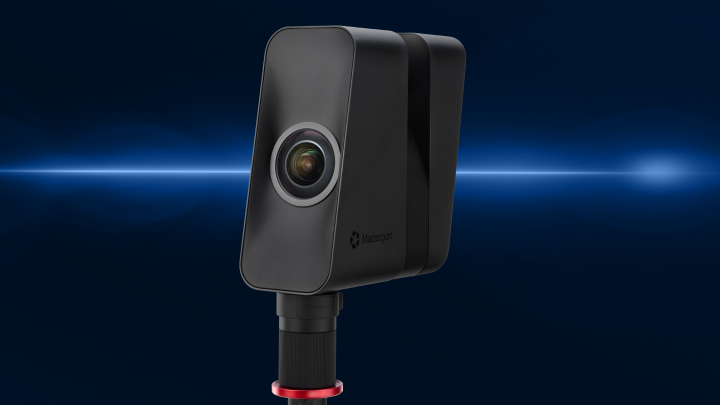
Take a demo at booth #1772 and complete the entry form. One grand prize winner chooses a Matterport Pro3 Performance Kit or a Premium Capture Services Package. Ten more winners each receive a Capture Services Package for spaces up to 7,500 sq ft.
Capture Services not available in all areas. Official rules apply.
TO EDIT: Change the class="spacer-3" to any number between 0 (none) and 5 (most) to resize a spacer. Ex. class="spacer-5"
Vertical spacers are responsive and 50% smaller on mobile than on tablet+.
TO SHOW SEPARATOR: Set class="d-block" on hr element
TO HIDE SEPARATOR: Set class="d-none" on hr element
TO EDIT SPACER: Change the class="spacer-3" to any number between 0 (none) and 5 (most) to resize a spacer. Ex. class="spacer-5"
Vertical spacers are responsive and 50% smaller on mobile than on tablet+.

Viva Las Vegas. Come play at booth #1772.
AI digital twin selfies, prizes, and Elvis
Three reasons to stop by, and one of them is Elvis.
- AI Digital Twin Selfie. Create a custom digital twin photo of yourself and send home a keepsake nobody else on the floor is handing out.
- Prizes. Take a demo, enter to win.
- Elvis. He is at the booth all week. Get the photo.
TO EDIT: Change the class="spacer-3" to any number between 0 (none) and 5 (most) to resize a spacer. Ex. class="spacer-5"
Vertical spacers are responsive and 50% smaller on mobile than on tablet+.
TO SHOW SEPARATOR: Set class="d-block" on hr element
TO HIDE SEPARATOR: Set class="d-none" on hr element
TO EDIT SPACER: Change the class="spacer-3" to any number between 0 (none) and 5 (most) to resize a spacer. Ex. class="spacer-5"
Vertical spacers are responsive and 50% smaller on mobile than on tablet+.
TO EDIT: Change the class="spacer-3" to any number between 0 (none) and 5 (most) to resize a spacer. Ex. class="spacer-5"
Vertical spacers are responsive and 50% smaller on mobile than on tablet+.
TO SHOW SEPARATOR: Set class="d-block" on hr element
TO HIDE SEPARATOR: Set class="d-none" on hr element
TO EDIT SPACER: Change the class="spacer-3" to any number between 0 (none) and 5 (most) to resize a spacer. Ex. class="spacer-5"
Vertical spacers are responsive and 50% smaller on mobile than on tablet+.
SESSION: Keep Your Scanner. Unlock Your Point Clouds.
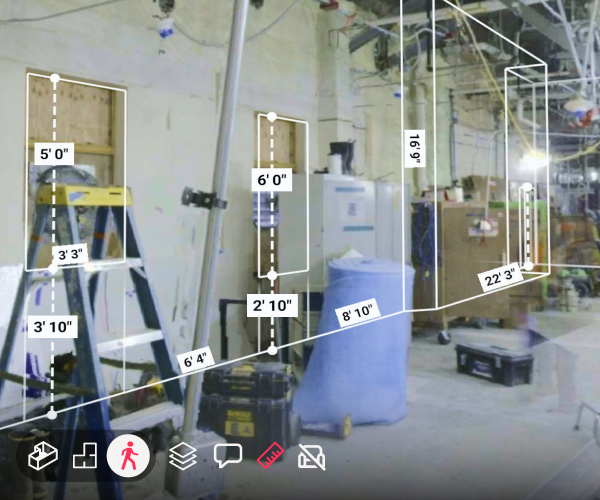
Your point clouds sit on a drive, useful only to the person who captured them. This session shows how to change that.
- See a live workflow turn raw scan data into a navigable Matterport digital twin that feeds Revit, AutoCAD, and Autodesk Forma.
- Compare a raw point cloud against a navigable twin with Scan-to-BIM and Scan-to-CAD output, and see which option works best for different use cases.
- Leave with a plan to add Matterport to the scanner your team already owns; no replacement required.
Speakers:
- Dominick Gallegos, Product Marketing
- Sun-Yen Tan, Product Manager
Wednesday, Sep 16 | 1:30 PM - 2:30 PM PDT
TO EDIT: Change the class="spacer-3" to any number between 0 (none) and 5 (most) to resize a spacer. Ex. class="spacer-5"
Vertical spacers are responsive and 50% smaller on mobile than on tablet+.
Editable Text
Editable Text
Editable Text
Editable Text
Editable Text
 Thank you.
See you at AWS re:Invent.
Thanks for your interest in meeting with Matterport. We'll follow up soon with additional information about AWS re:Invent.
We're excited to introduce you to all the business benefits Matterport has to offer.
Thank you.
See you at AWS re:Invent.
Thanks for your interest in meeting with Matterport. We'll follow up soon with additional information about AWS re:Invent.

©
Matterport, LLC. All rights reserved.
Matterport, 3D Showcase, Mattertag, and Virtual Walkthrough are registered trademarks of Matterport, LLC. Terms, conditions, features, support, pricing and service options are subject to change without notice. Trademarks and service marks are the property of Matterport, LLC. All rights reserved.