
TO SHOW SEPARATOR: Set class="d-block" on hr element
TO HIDE SEPARATOR: Set class="d-none" on hr element
TO EDIT SPACER: Change the class="spacer-3" to any number between 0 (none) and 5 (most) to resize a spacer. Ex. class="spacer-5"
Vertical spacers are responsive and 50% smaller on mobile than on tablet+.
Build excitement with a headline that's two lines
Talk about what attendees will get out of the event and what they’ll experience that they won’t get anywhere else.
Register Now
TO SHOW SEPARATOR: Set class="d-block" on hr element
TO HIDE SEPARATOR: Set class="d-none" on hr element
TO EDIT SPACER: Change the class="spacer-3" to any number between 0 (none) and 5 (most) to resize a spacer. Ex. class="spacer-5"
Vertical spacers are responsive and 50% smaller on mobile than on tablet+.
TO SHOW SEPARATOR: Set class="d-block" on hr element
TO HIDE SEPARATOR: Set class="d-none" on hr element
TO EDIT SPACER: Change the class="spacer-3" to any number between 0 (none) and 5 (most) to resize a spacer. Ex. class="spacer-5"
Vertical spacers are responsive and 50% smaller on mobile than on tablet+.
Webinar
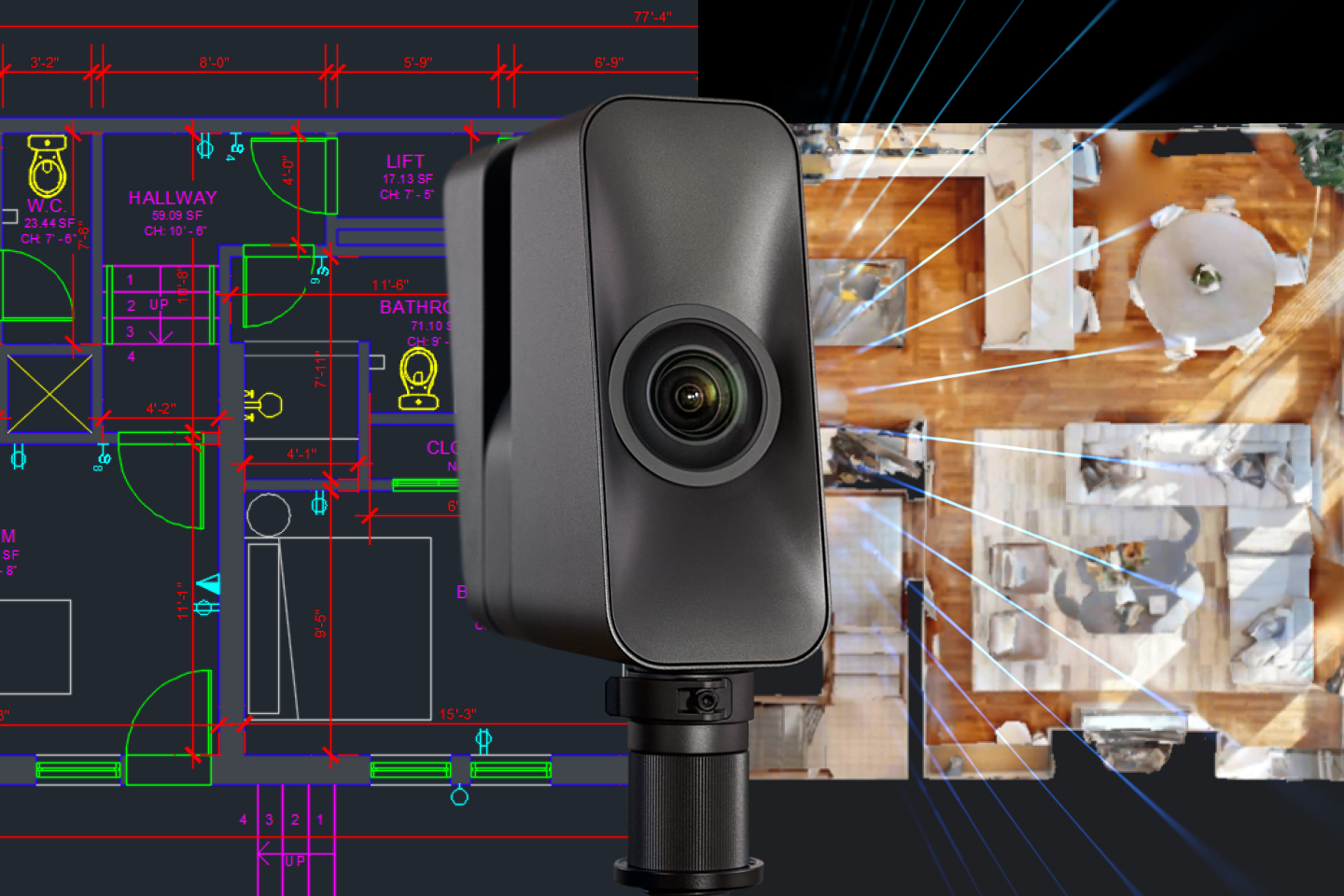
Still Starting in CAD? Start Faster with Scan to CAD from Matterport
Turn dimensionally accurate LiDAR scans into QA-checked DWG files in a few business days; without manual surveying, recap conversation, or tracing point clouds.
TO EDIT: Change the class="spacer-3" to any number between 0 (none) and 5 (most) to resize a spacer. Ex. class="spacer-5"
Vertical spacers are responsive and 50% smaller on mobile than on tablet+.
TO SHOW SEPARATOR: Set class="d-block" on hr element
TO HIDE SEPARATOR: Set class="d-none" on hr element
TO EDIT SPACER: Change the class="spacer-3" to any number between 0 (none) and 5 (most) to resize a spacer. Ex. class="spacer-5"
Vertical spacers are responsive and 50% smaller on mobile than on tablet+.
Wednesday, March 25th
 8:30 am PT | 11:30 am ET | 3:30 pm GMT
Many AEC teams still begin projects in 2D CAD.
- Manual site surveys
- Converting point clouds in Recap
- Scaling and aligning in AutoCAD
- Tracing geometry by hand
- Multiple QA cycles
Scan to CAD from Matterport eliminates those steps.
Capture once with a depth-enabled camera. Order CAD directly from your Matterport space. Receive professionally modeled, QA-reviewed DWG, DXF, and PDF files; ready to use in AutoCAD or other design software.
No drafting from scratch.
No vendor back-and-forth.
No waiting weeks to start design.
Register today.
Meet the team

Dominick Gallegos
Product Marketing,
Matterport

Kyle Keller
Solutions Engineer,
Matterport

Irene Wangpataravanich
Product Manager,
Matterport
TO EDIT: Change the class="spacer-3" to any number between 0 (none) and 5 (most) to resize a spacer. Ex. class="spacer-5"
Vertical spacers are responsive and 50% smaller on mobile than on tablet+.
TO SHOW SEPARATOR: Set class="d-block" on hr element
TO HIDE SEPARATOR: Set class="d-none" on hr element
TO EDIT SPACER: Change the class="spacer-3" to any number between 0 (none) and 5 (most) to resize a spacer. Ex. class="spacer-5"
Vertical spacers are responsive and 50% smaller on mobile than on tablet+.

Reduce manual work
When to use Scan to CAD vs. Scan to BIM.

Smooth integration with existing tools
Matterport easily integrates with AutoCAD, Revit, Procore, and similar tools to streamline operations with ease.
Promote standardization across projects
Get consistent layers, naming, and quality for CAD deliverables.
TO EDIT: Change the class="spacer-3" to any number between 0 (none) and 5 (most) to resize a spacer. Ex. class="spacer-5"
Vertical spacers are responsive and 50% smaller on mobile than on tablet+.
TO SHOW SEPARATOR: Set class="d-block" on hr element
TO HIDE SEPARATOR: Set class="d-none" on hr element
TO EDIT SPACER: Change the class="spacer-3" to any number between 0 (none) and 5 (most) to resize a spacer. Ex. class="spacer-5"
Vertical spacers are responsive and 50% smaller on mobile than on tablet+.
TO EDIT: Change the class="spacer-3" to any number between 0 (none) and 5 (most) to resize a spacer. Ex. class="spacer-5"
Vertical spacers are responsive and 50% smaller on mobile than on tablet+.
 Thank you for registering
Scan to CAD: Start Faster with Matterport
Wednesday, March 25th
8:30 am PT | 11:30 am ET | 3:30 pm GMT
A confirmation email with calendar links is on its way.
What to Expect
In 45 minutes, you’ll see:
- How to go from LiDAR scan to QA-checked DWG in days
- What’s included in Architecture, Furniture, and Electrical scopes
- When to choose Scan to CAD vs. Scan to BIM
- Real workflow examples inside AutoCAD
Come prepared with your questions. We’ll leave time for live Q&A.
In the meantime, explore our previous webinars to learn more about how customers use Matterport to their advantage.

©
Matterport, LLC. All rights reserved.
Matterport, 3D Showcase, Mattertag, and Virtual Walkthrough are registered trademarks of Matterport, LLC. Terms, conditions, features, support, pricing and service options are subject to change without notice. Trademarks and service marks are the property of Matterport, LLC. All rights reserved.