
TO SHOW SEPARATOR: Set class="d-block" on hr element
TO HIDE SEPARATOR: Set class="d-none" on hr element
TO EDIT SPACER: Change the class="spacer-3" to any number between 0 (none) and 5 (most) to resize a spacer. Ex. class="spacer-5"
Vertical spacers are responsive and 50% smaller on mobile than on tablet+.
Build excitement with a headline that's two lines
Talk about what attendees will get out of the event and what they’ll experience that they won’t get anywhere else.
Register Now
TO SHOW SEPARATOR: Set class="d-block" on hr element
TO HIDE SEPARATOR: Set class="d-none" on hr element
TO EDIT SPACER: Change the class="spacer-3" to any number between 0 (none) and 5 (most) to resize a spacer. Ex. class="spacer-5"
Vertical spacers are responsive and 50% smaller on mobile than on tablet+.
TO SHOW SEPARATOR: Set class="d-block" on hr element
TO HIDE SEPARATOR: Set class="d-none" on hr element
TO EDIT SPACER: Change the class="spacer-3" to any number between 0 (none) and 5 (most) to resize a spacer. Ex. class="spacer-5"
Vertical spacers are responsive and 50% smaller on mobile than on tablet+.
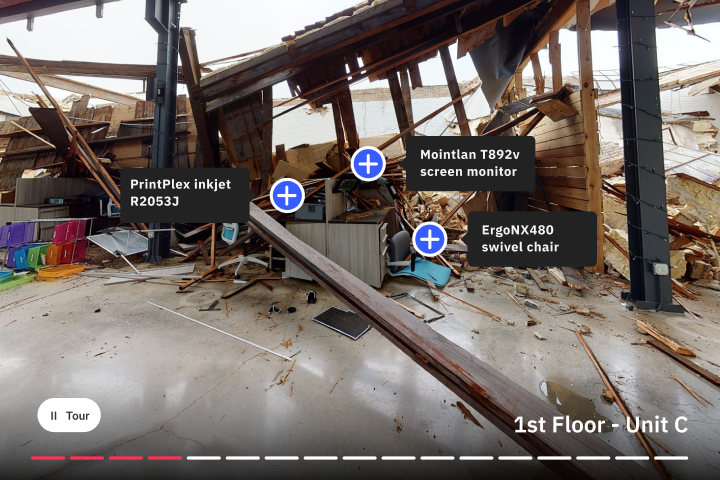
Webinar
Tell Me You’re in Restoration Without Telling Me
How Faulkner Restoration built claim-ready documentation without the drive-back tax.
TO EDIT: Change the class="spacer-3" to any number between 0 (none) and 5 (most) to resize a spacer. Ex. class="spacer-5"
Vertical spacers are responsive and 50% smaller on mobile than on tablet+.
TO SHOW SEPARATOR: Set class="d-block" on hr element
TO HIDE SEPARATOR: Set class="d-none" on hr element
TO EDIT SPACER: Change the class="spacer-3" to any number between 0 (none) and 5 (most) to resize a spacer. Ex. class="spacer-5"
Vertical spacers are responsive and 50% smaller on mobile than on tablet+.
Tuesday, June 2nd
 8:30 am PDT | 11:30 am EDT
Matterport helps restoration teams replace hand sketches with a faster, more consistent documentation workflow.
Hear firsthand from Faulkner Restoration’s owner about how his company leveraged Matterport and saved an estimated eight to ten hours per week per project manager by reducing drive-backs and making repair scoping easier than the model.
Register for our upcoming webinar on Tuesday, June 2nd, and get tips and tricks on how digital twins help teams get faster, cleaner documentation so they can stay competitive under tight deadlines.
Register today.
Speakers

Dominick Gallegos
Product Marketing,
Matterport

Michael Means
Owner,
Faulkner Restoration

Tim Kern
Customer Success Manager,
Matterport
TO EDIT: Change the class="spacer-3" to any number between 0 (none) and 5 (most) to resize a spacer. Ex. class="spacer-5"
Vertical spacers are responsive and 50% smaller on mobile than on tablet+.
TO SHOW SEPARATOR: Set class="d-block" on hr element
TO HIDE SEPARATOR: Set class="d-none" on hr element
TO EDIT SPACER: Change the class="spacer-3" to any number between 0 (none) and 5 (most) to resize a spacer. Ex. class="spacer-5"
Vertical spacers are responsive and 50% smaller on mobile than on tablet+.
Create claim-ready records
Estimators can scope from the model, confirm measurements, and catch small details to improve estimate accuracy.

Reduce disputes over pre-existing conditions
Give crews a clearer understanding of the job before they arrive with a faster, more consistent digital documentation workflow.

Save time and costs
Matterport speeds up the process without compromising documentation accuracy by reducing drive-backs and making repair scoping easier.
TO EDIT: Change the class="spacer-3" to any number between 0 (none) and 5 (most) to resize a spacer. Ex. class="spacer-5"
Vertical spacers are responsive and 50% smaller on mobile than on tablet+.
TO SHOW SEPARATOR: Set class="d-block" on hr element
TO HIDE SEPARATOR: Set class="d-none" on hr element
TO EDIT SPACER: Change the class="spacer-3" to any number between 0 (none) and 5 (most) to resize a spacer. Ex. class="spacer-5"
Vertical spacers are responsive and 50% smaller on mobile than on tablet+.
TO EDIT: Change the class="spacer-3" to any number between 0 (none) and 5 (most) to resize a spacer. Ex. class="spacer-5"
Vertical spacers are responsive and 50% smaller on mobile than on tablet+.
 Thank you for registering
In the meantime, explore our previous webinars to learn more about how customers use Matterport to their advantage.

©
Matterport, LLC. All rights reserved.
Matterport, 3D Showcase, Mattertag, and Virtual Walkthrough are registered trademarks of Matterport, LLC. Terms, conditions, features, support, pricing and service options are subject to change without notice. Trademarks and service marks are the property of Matterport, LLC. All rights reserved.